Assets
Overview
An Asset is the core monitoring unit of the platform. It represents any physical or logical entity that your organization wants to track, monitor, or manage — and its definition is entirely up to you.
Depending on your operational structure, an asset could be:
- A machine or piece of equipment on a factory floor
- A building or office within a campus
- A vehicle or mobile unit in a fleet
- A production line, zone, or area
- Any other infrastructure component relevant to your operations
The platform makes no assumption about what an asset is. You define the hierarchy that best reflects your real-world infrastructure.
Flexible Asset Modeling
Assets sit within the platform hierarchy between Asset Groups and Devices:
Location
└── Asset Group
    └── Asset          ← you define what this represents
        └── Devices & Sensors
This flexibility allows the same platform to support very different operational structures simultaneously. For example:
Example A — Machine-Centric Model
Location: Barcelona Asset Groups: Factory A, Factory B Assets: CNC Machine 01, Conveyor Belt 03, Compressor Unit 7 Devices: Vibration sensor, temperature probe, GPS tracker
In this model, each asset is a specific piece of equipment. Devices attached to it collect performance and condition data.
Example B — Facility-Centric Model
Location: Barcelona Asset Groups: District North, District South Assets: Office Block A, Warehouse 2, Retail Unit 5 Devices: Smart plugs, energy meters, multi-sensor units, access controllers
Here, each asset is a building or space. Devices monitor environmental conditions, energy consumption, and access events across the facility.
Devices Within an Asset
Regardless of what an asset represents, it serves as the attachment point for one or more devices and sensors. These can include:
- Tracking devices
- Environmental sensors (temperature, humidity, air quality)
- Energy meters and smart plugs
- Cameras and access control hardware
- Multi-sensor devices
- Any other connected hardware unit
All telemetry collected by these devices is associated with and visible through the asset they belong to.
Asset Properties
Each asset in the platform holds the following core information:
| Field | Description |
|---|---|
| Name | Human-readable identifier for the asset |
| Asset Group | The group this asset belongs to within a location |
| Type | Category or classification defined by your organization |
| Status | Current operational state (active, inactive, maintenance, etc.) |
| Devices | Connected hardware units assigned to this asset |
| Alerts | Active or historical alert conditions tied to this asset |
What You Can Do With Assets
From the Assets module you can:
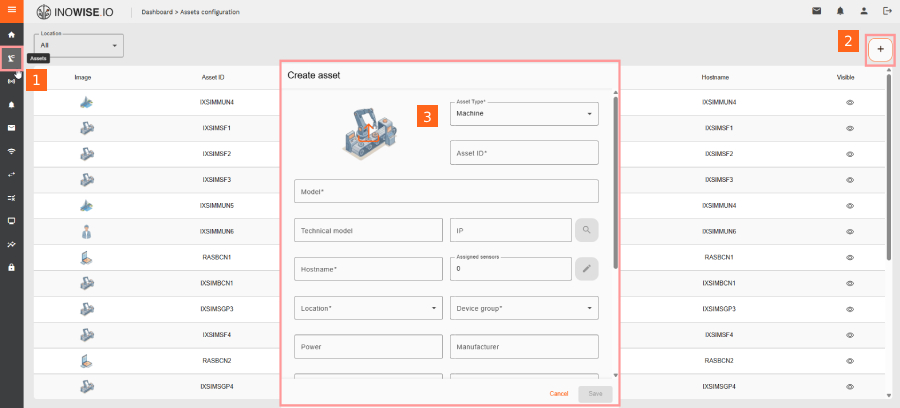
- Create and configure assets that reflect your operational structure
- Assign devices and sensors to begin collecting telemetry
- Monitor real-time status including connectivity, sensor readings, and alerts
- View historical data for performance trends and operational insights
- Set up monitoring rules that trigger alerts based on asset conditions
- Organize assets into logical groups aligned with your locations and facilities
Getting Started
Before creating assets, ensure the following are already configured:
- A Customer account exists
- At least one Location has been defined
- An Asset Group has been created within that location
Once these are in place, assets can be created and devices can be onboarded and assigned to them.